How to start playing on our server?
Interested in playing on our server? Well, it’s quite simple.
To start playing with us, you need to have the game itself and connect to the server. There are two ways to do this: via IP address or by searching in the server list. Both options are very straightforward.
Copy our IP address in advance.
89.222.108.82:7142
Then, in the main game menu, click on “Multiplayer” (1).
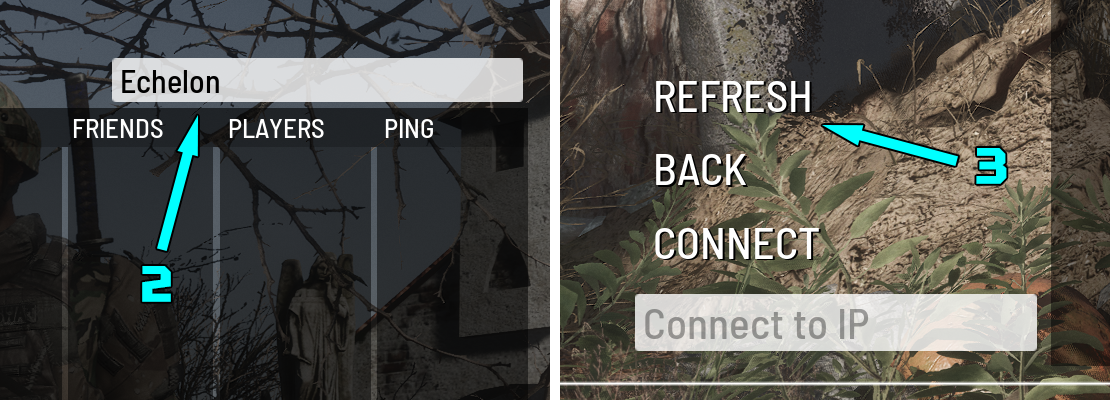
Insert our IP address, which you just copied, into the input field (2) and click “Connect” (3).
If you did everything correctly, the game should have prompted you to create a new character. That’s it, welcome to our world!
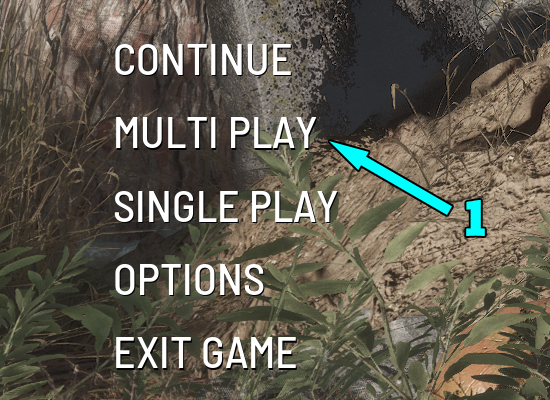
Click on “Multiplayer” (1) in the main game menu.
Next, in the search field, enter the name of our project (2) and press the Enter key or click the “Refresh” menu item (3).
Our server will appear in the list. Select it and click “Connect” or double-click to join.