Frequently Asked Questions
Don’t know what to do? Not sure where to look? Here are answers to the most common questions to help you navigate the gameplay, server features, and community better. If you’re looking for quick and useful answers to typical questions, this page is for you!
Step-by-step instructions for receiving the Welcome Pack are provided on a separate page.
Step-by-step instructions for receiving the Daily Pack are provided on a separate page.
To join our server, you need to copy our IP address 136.243.0.86:7062 and paste it into the connection field, or use the server name ECHELON to find us through the server search.
How to do this is described on a dedicated page.
This type of raiding is also called a “raid of devastation” or a “wipe raid.” During such a raid, the enemy’s base is completely destroyed, including both items and structures, even if there is no logical purpose for it.
If a wall or structure is destroyed to reach the enemy or loot, such an action is entirely justified.
However, if a wall or structure is destroyed without a specific purpose, except to “destroy for the sake of leaving nothing behind,” it is not considered justified and violates our rules. War is war, but the game remains a game. Building bases takes time and effort from other players, so show a minimum of respect for your opponent and don’t destroy everything to the last piece.
Encountered an issue or have some questions? Visit the ticket-support channel and create a ticket, describing your problem or stating your question. Shortly after, someone will get in touch with you.
Most likely, the problem is related to your hard disk drive (HDD). The speed of reading and writing to the disk is extremely important in modern games. We recommend, if possible, purchasing an SSD, as the game itself requires it. Otherwise, you may experience regular issues until you upgrade your storage.
You can also try lowering the graphics settings and disabling unnecessary programs, but this does not guarantee a complete solution to the problem.
If you are experiencing connection issues with the server, please perform the following test and provide the necessary information via ticket in Discord:
- 📥 Download the WinMTR utility
Download the free utility WinMTR from this link: WinMTR. - ⚙️ Test setup
• Launch WinMTR.
• Enter the server IP address in the appropriate field (⚠️ without the port!).
• Ensure that there are no extra spaces at the beginning or end, as this may cause an error. - 🎚️ Run the test
Click “Start” and run the test with 1000 or more pings while experiencing connection issues. - 💾 Save the results
• After the test is completed, click “Export TEXT” and save the results as a.txtfile.
• This file will need to be attached to your ticket. - 🌐 Provide your IP address
Also, send us your public IP address. You can find it by simply searching in Google: “what’s my IP”. This is needed so we can perform an MTR test from the server to your IP address and investigate potential packet loss. - 🆔 Provide your Steam ID
We also need to know your Steam ID.
To find your Steam ID:
• Open Steam and go to your “Profile”.
• Click “Edit Profile” and copy your profile URL.
• Go to the website: Steam ID Finder
• Paste your profile URL in the field and click “Lookup”.
• Copy your Steam ID64 and send it to us. - 🎫 Provide the information through the ticket
After completing all steps, provide the following information via ticket in Discord:
✔️ WinMTR results (.txt file)
✔️ Your public IP address
✔️ Your Steam ID64
How to create a ticket is described in detail on the page.
This information will help us quickly identify and resolve the connection issue!
To change the bot’s language, you first need to go to the #commands channel (1) and enter the /set-language command (2). Then, in the additional field, add the number (3) corresponding to the desired language.
1 Portuguese
2 English
3 Russian
4 Thai
5 Spanish
6 Italian
7 French (France)
8 Korean (Korea)
9 Chinese Traditional
10 Greek
11 German
12 Ukrainian
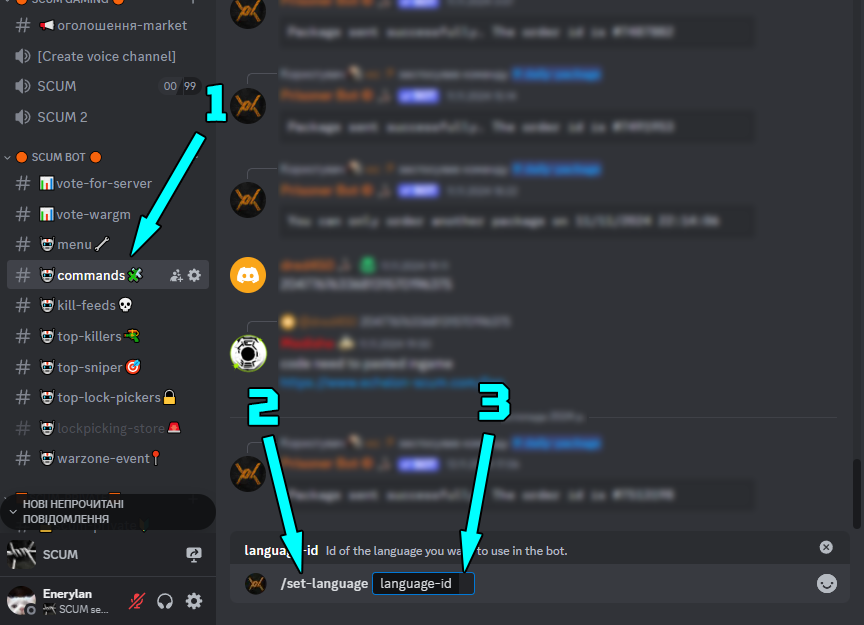
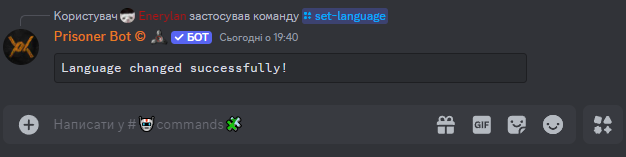
Then press Enter, and… that’s it, the bot’s language will be changed.
As experienced players with years of expertise in various game genres, we’ve always wanted a place where we could fully immerse ourselves in a game without compromising our expectations for quality and conditions. When we started actively playing SCUM, we realized that existing servers didn’t meet our standards or offer the experience we were looking for. Some servers were too easy, others too challenging, and many lacked proper support and community.
One of the biggest disappointments was that on many servers, admins actively interfered with gameplay: giving hints to their friends, providing advantages to certain players, or leaking crucial information. This destroys the spirit of fair play and spoils the experience for everyone else.
As a result, we decided to create our own server, combining the best of both worlds—a hardcore gameplay with balanced conditions that don’t turn the game into a constant struggle. We know that perfect servers don’t exist, but we strive to make ours a unique place where every player can find something for themselves. We gathered a team of like-minded people who, like us, understand that the game should be interesting, engaging, and fair.
Our server is the result of our experience, vision, and desire to create something special that stands out among others. We don’t interfere with gameplay, we don’t give advantages, and we don’t leak information—all to ensure that every player can feel the true challenge and joy of fair play. We didn’t just launch a server; we created a place that reflects our gaming values and ideals.